Set Your AI Up Right: How Claude Gets Better With Workflows, Skills and Checks
Claude writes most of Sonic Weaver. What makes it reliable is the setup around it: instructions, skills, workflows, memory and checks that catch its mistakes. Real examples inside.
Sonic Weaver Team9 min read
Sonic Weaver is built by a very small team, and most of its code is written by Claude, Anthropic's AI, directed by our founder. People ask how that can produce a program with dozens of visualizer engines, two editors and a studio of workspaces without falling apart. The founder's answer is short.
Set your AI right and you can do anything.– Sonic Weaver's founder
This post is what "set right" means in practice. Every example below happened while we built this week's release, including the mistakes, because the mistakes are the point.
Anything is the goal, not a promise
The AI still gets things wrong, and every scenario here includes a wrong step. A good setup does not stop mistakes. It finds them before they reach you.
The model is the engine; the setup is the car
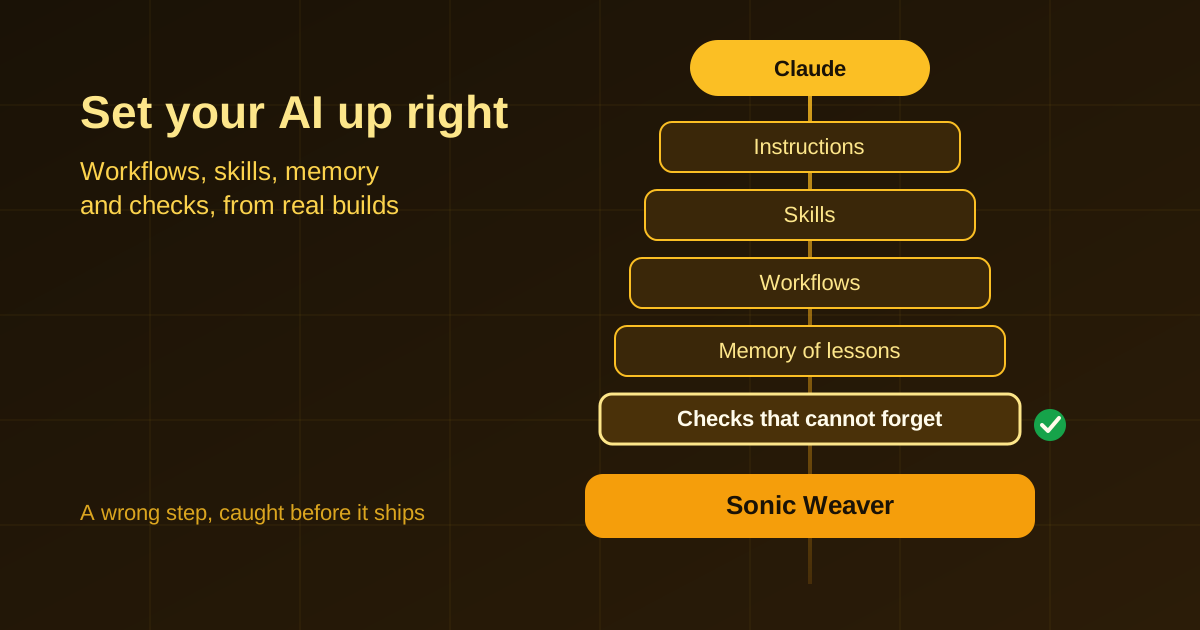
Every Claude session starts fresh, with no memory of your project. What it knows about how you work comes from what it is given: the instructions it reads first, the files it opens, and the tools it is allowed to use. The same model with a different setup gives very different results. Ours has six layers, from Claude down to the files on our own machine:
- Instructions. A short project file (CLAUDE.md or AGENTS.md) that Claude reads at the start of every session: the rules that never change, such as spend nothing new, never post or message anyone on our behalf, and run the checks before anything ships.
- Skills. A written procedure Claude loads only when a job needs it: how to route a request, how to plan a job before starting it, how to write production code, how to review a release. Because a skill loads only when used, a long procedure costs almost nothing the rest of the time.
- Workflows. Our library of procedures, each with the phrases that should trigger it, what a good result contains and the checks it must pass. The skills are generated from it, so one written source feeds every AI tool we use.
- Memory. Lessons from past mistakes, written down as they happen: what went wrong, why, and the rule that prevents it. A new lesson starts as a candidate and becomes a rule only after it is checked against the evidence.
- Checks. Tests and a release gate that runs in every build. A build that fails a check does not go live.
- Access. The tools Claude may use, with limits, including our own site through MCP, the open standard for connecting AI assistants to tools.
The order matters. Claude Code's own documentation says it plainly: instructions and memory are context Claude reads, not configuration it is forced to obey. So a rule that must hold cannot live only in the instructions. It has to be a check.
Scenario 1: the test was wrong, not the feature
This week Claude gave every creation workspace on the site a launch link that an AI assistant can open already set up: the look chosen, the frame size set, the words filled in. A browser test opens each link and confirms the setup arrived. One case kept failing: Generate visualizer's starter look "never appeared".
The feature worked. Opening the link showed the right look chosen and the preview ready. The test was waiting for a part of the page that only appears on a different tab, so it could never pass. The AI had written a test that could not succeed, then spent time hunting a bug that did not exist.
The fix was the test, plus a rule we now apply to every new check: prove it fails on the defect it guards. The new test waits for the exact look the link named. Then we opened the page without that setting, and confirmed the test fails. A check that has never failed has never been tested.
Break it once
Before you trust a new check, break the thing it protects on purpose and watch the check go red. Then put it back.
Scenario 2: a number that was true until it was not
SW Agent, the assistant built into Sonic Weaver, answers help questions from an index split into pieces, so a question loads only the few pieces it needs instead of everything. A test said a first answer reads at most six pieces. It had quietly started failing: the index had grown to 34 pieces, and the same question now touched seven.
The tempting fix is to change six to seven. That only lasts until the next help article. The real rule was never "six". It was "read only the pieces this question's words live in, and a small share of the whole". We wrote that instead, then proved it by making the search load one piece it did not need. The test caught it at once.
It had also been failing unnoticed, because it is not one of the checks every build runs. That is a second lesson in one: a test only protects you when something runs it. When an AI writes a limit, ask what the limit stands for, test that, and make sure the test is run.
Scenario 3: rules that live in checks, not in reminders
We retired several older sites this year, and our instructions say not to present them as if they were live. A help article written last week still named one. Nobody would have spotted it by reading. A test that scans the pages we publish for AI assistants did, and the article was reworded the same day.
Another: seven features shipped last week without a line in the changelog. We keep a matrix of every system against every surface it must reach: its page, its help, its tests, the browser checks, MCP, SW Agent and the changelog. Anything missing is recorded as a known gap, with a reason and a date, and the list can only shrink. When a gap is closed but its line is left behind, the build fails too, so the list never lies. This week's release notes closed those seven gaps.
An instruction is something the AI should remember. A check is something it cannot forget.
Scenario 4: several AIs at once, and one integrator
This week three Claude agents worked side by side in separate lanes, on SW Agent's reasoning, on a calculator and geometry, and on new creator tools, while a fourth session did the integration. Each lane works in its own copy of the project, edits and runs focused tests. One session merges, builds, checks and ships, once.
We learned that shape the hard way. Earlier, several agents each started their own development server and ran the computer out of memory. Another time, merging the lanes broke three questions SW Agent used to answer correctly. The benchmarks caught the drop before release, because every build compares SW Agent's scores with a floor. The fix went in at the cause, in how SW Agent reads those words, and not by copying the test questions into what it learns from. That would have raised the score and made it a lie.
- Run few agents, each with a lane named for its outcome and one thing it must not touch.
- Give every writer its own copy of the project, and keep one integrator.
- Read the agent's work, not just its report: an honest summary can still be wrong.
- Keep test questions apart from training data, and check that they never overlap.
Plan the job before the first step
Every substantial job starts with a short written plan. It names the deliverable and one thing we will not do. It marks every value we assumed rather than read as an assumption, right beside the value. It runs first the cheap check that could end the job, such as whether the file exists or whether the policy allows it at all, before the expensive work. A question goes to the owner only when the answer changes what happens next.
How this works with Sonic Weaver
The same thinking runs through the site, so you can use it too:
- SW Agent's chains are workflows: a job as steps, each one a call to one of our tools, shown as a graph while it runs. Try SW Agent, and see Creator workflows for how to do each creative job.
- Claude, or any assistant that speaks MCP, can use Sonic Weaver directly: find a look, open any workspace already set up, plan a job with SW Agent and read what is new, with every request rate-limited like our public API. Connect it from the MCP server page.
- Our checks are public: the status page shows what every release must pass, SW Agent's benchmark scores, and the gaps that are not built yet.
- What the program is, and where it is going, is on our vision.
A starter setup for your own AI
- Write the rules that never change in one instructions file. Keep it short and specific; vague rules get vague results.
- Turn every procedure you keep pasting into chat into a skill: when it applies, the steps, and what done looks like.
- Keep a lessons file. Write down each mistake, why it happened and the rule that prevents it.
- Make every rule that matters a check, prove each check fails once, and make sure something runs it.
- Give the AI the tools it needs with limits: read-only where you can, rate limits, and nothing that spends money or speaks for you without asking first.
- Review what it did, not what it says it did.
Set up like this, Claude gets through work that would take a team: this week alone, launch links for every workspace, release notes, new MCP tools and the checks that hold them in place. It still makes mistakes. The difference is that the setup finds them before you do.
Reviewed by the editorial team. Report a correction.
Blog
Keep reading
Was this page helpful?
Anonymous. Only this page’s address and your yes/no are recorded, and only if you allowed analytics cookies.
Make your own
Ready to make your own?
Open the editor, drop in a track, and export a watermark-free video: free, no account.